Table of Contents
- Immediate Steps to Take When Your Phone Gets Wet
- How to Dry the Exterior and What to Avoid
- Signs of Water Damage in Phone: What to Look For
- Is Rice Good for Water Damaged Phone? The Truth About Drying Myths
- Drying Timeline and Safe Testing Criteria
- Professional Water Damage Phone Repair Cost and Repair vs. Replace
- Data Backup and Recovery Priorities
- Frequently Asked Questions
Last Updated: October 5, 2026
Immediate Steps to Take When Your Phone Gets Wet
A water damage phone needs fast action. The first 60 seconds decide how much survives.
At Sentinel Restoration, we’ve seen how quickly liquid exposure turns into corrosion. Move now, and your odds improve.
Here’s the short version:
- Pull the phone out of the liquid right away
- Turn it off and keep it powered down
- Do not charge or power on the device
Turn It Off and Keep It Powered Down
Power down the phone the moment it leaves the liquid. If it’s already off, leave it off.
Electricity and moisture don’t mix: a live circuit plus liquid equals fast internal damage, and the charging port and speaker openings are the easiest paths to the board.
A common mistake is pressing buttons to “check if it still works.” Every press sends current through wet components.
Keep it powered off until fully dry, hours, not minutes. If the screen flickers, don’t touch it.
Remove the Case, SIM Card, and Accessories
Strip the phone down to the bare device. Trapped moisture is the enemy.
- Pop off the protective case and any skin
- Eject the SIM card or USIM tray
- Remove the memory card if your model has one
Each opening is a place where liquid pools and can’t escape. Removing the SIM card also protects your contacts if the phone doesn’t recover.
On older models with a removable battery, take it out. That single step often decides whether the phone lives. On sealed phones, skip it.
How to Dry the Exterior and What to Avoid
Drying the outside is simple; drying it wrong causes more harm than the water did. Remove surface moisture and let the inside dry on its own schedule.
Dab Dry with a Clean Cloth
Use a dry towel, clean cloth, or paper towel. Blot, don’t rub.
- Wipe the screen and back panel
- Dab around the charging port
- Soak up water near the speaker openings
Hold the phone so water drains out of the openings. A gentle shake helps; a hard shake flings droplets deeper past gaskets.
Match the Drying Response to the Liquid
Not all liquids behave the same inside a phone. The drying method is the same, but urgency and corrosion risk change with what the phone fell into.
- Fresh water (tap, rain, puddle): The mildest case. Low minerals mean slower corrosion; air drying at room temperature is usually enough if you act fast.
- Salt water or pool water: The worst common case. Chloride ions accelerate corrosion, and salt crystals keep pulling moisture from the air. Rinse the exterior (not the inside) with fresh water, then get a professional board-level cleaning, air drying alone won’t stop corrosion.
- Sugary drinks (soda, juice, coffee with cream and sugar): Leaves a sticky residue that bridges contacts and attracts dust, causing intermittent shorts even after drying. This is a technician job.
Immersion time and depth matter too: a two-second splash differs from a ten-minute soak, and longer, deeper submersion makes it more likely liquid reached the board through the speaker mesh, microphone ports, and SIM tray opening.
Sealed Phones vs. Removable-Battery Models
How you dry the phone depends on what you can safely open.
On older models with a removable back cover and battery, take the battery out before drying, that removes the largest power source and gives the inside a path to dry.
On sealed phones, nearly every recent flagship, do not pry the back off. You’ll crack the adhesive seal, break the wireless charging coil, or tear a ribbon cable.
Do Not Use Heat or Compressed Air
Heat is the fastest way to turn a wet phone into a dead one. Skip the hair dryer, oven, and microwave.
Heat warps screens, cooks the battery, and pushes moisture deeper; compressed air forces water past seals into places it never reached.
Never put a wet phone in the microwave or oven to dry it. This can destroy the battery and start a fire. The heat does not dry the inside, and the risk is real.
Leave the phone in open air at room temperature.
Water-Resistance Ratings Are Not a Free Pass
If your phone carries an IP rating, IP67 or IP68 are common, understand what it promises. It’s tested in fresh water under controlled lab conditions for a limited time and depth, and does not cover salt water, chlorinated pool water, soapy water, or pressurized streams. It degrades as adhesives age, as the phone is dropped, and as it is repaired, so a phone that was IP68 on day one may not be after two years.
Signs of Water Damage in Phone: What to Look For
The signs of water damage in phone vary from obvious to invisible. Some show up right away. Others appear weeks later.
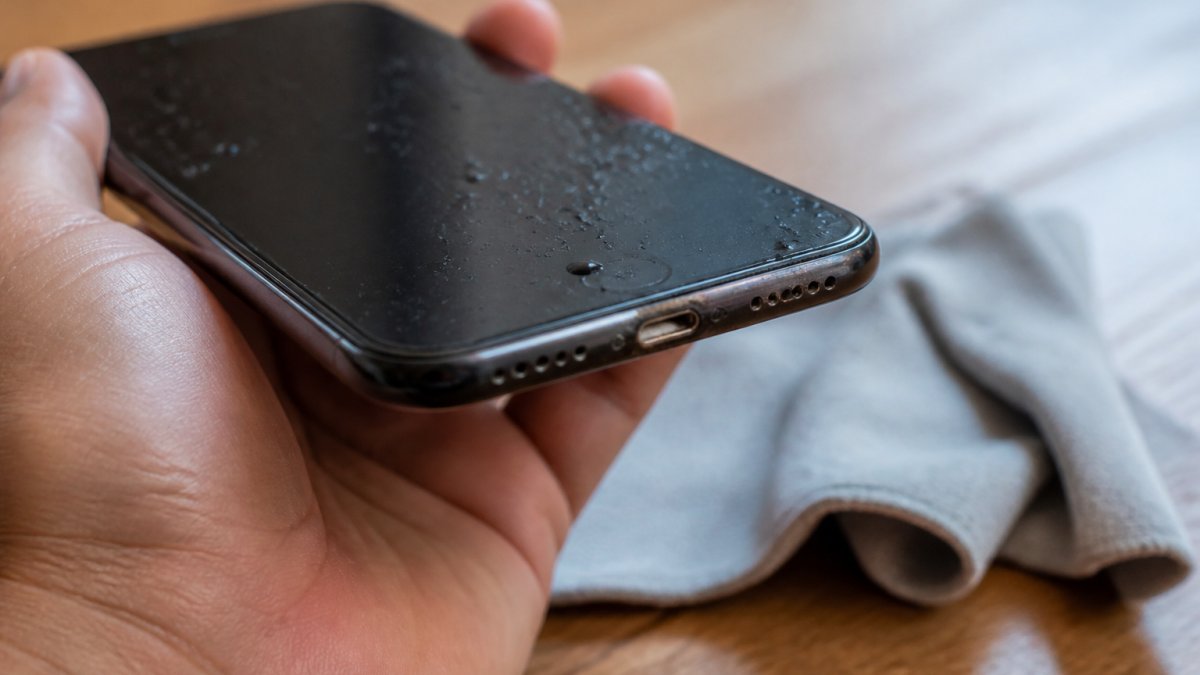
Watch for these:
- Fog or droplets behind the camera lens or screen
- A screen that flickers, dims, or shows dead spots
- Speakers that sound muffled or crackly
Many phones have a liquid-damage indicator, a small strip inside the SIM tray or port that changes color after liquid exposure. A changed strip is a strong clue.
If the phone works fine today but showed any of these signs, don’t assume it’s safe. Corrosion often spreads slowly and kills the device weeks later.
Is Rice Good for Water Damaged Phone? The Truth About Drying Myths
No. Rice is not good for a water damaged phone. It’s one of tech’s most repeated myths.
Rice doesn’t pull moisture out of a sealed device, it only touches the outside, which air already dries.
The myth survives because people try rice, wait a few days, and the phone happens to work again.
Other myths to skip:
- Hairdryers: heat damage, as covered above
- Ovens and microwaves: fire and battery risk
- Shaking hard: pushes water deeper inside
Air drying at room temperature beats every one of these.
Drying Timeline and Safe Testing Criteria
Give a wet phone 48 to 72 hours to air dry before testing, longer than most people want to hear.
Most people test too soon. A phone that powers on after six hours may still have moisture trapped behind the display, under the board’s shield cans, or inside the camera module. That moisture keeps working on the metal traces, and corrosion often shows up days or weeks later as a dead screen, a failed charging port, or a phone that won’t boot.
Why the Timeline Is What It Is
Water doesn’t evaporate out of a sealed phone like it does off a countertop. Liquid that entered through the speaker mesh, microphone port, or SIM tray must diffuse back out through the same narrow openings, a slow process that slows further in humid air or a closed room. Room-temperature air movement is the only thing that helps. Heat speeds evaporation but damages components; a fan is fine as long as it’s not compressed air forced into the openings.
Use this timeline as a guide:
| Time After Exposure | What to Do | What to Avoid |
|---|---|---|
| First 30 minutes | Power off, strip accessories, dab dry | Charging, button pressing |
| 1-24 hours | Air dry in open space | Heat, rice, compressed air |
| 24-72 hours | Keep drying, check for fog | Powering on early |
| After 72 hours | Test power-on once | Repeated on/off cycles |
What ‘Dry’ Actually Means Before You Test
Before pressing the power button, check the phone against these criteria. If any fail, keep waiting.
- No visible fog or droplets behind the camera lens or under the screen glass
- No moisture visible in the charging port or speaker openings under an angled light
- The SIM tray and card are completely dry to the touch
If all five pass, do a single power-on test. If it boots normally, check the screen for dead spots or discoloration, play audio through both speakers, open the camera, and plug in a charger to confirm the port works. If anything misbehaves, power it off and stop testing.
If you must charge the phone before it’s fully dry, don’t. Charging a wet phone is the single most common cause of permanent liquid damage. Wait the full 72 hours.
Warning Signs That Need a Technician, Not More Waiting
Some symptoms mean the phone has moved past the air-dry stage. Stop handling it and get a professional inspection if you see any of these:
- Heat or swelling: A phone warm to the touch while powered off, or a bulging back panel, has a battery problem. Don’t charge or press it, and keep it away from anything flammable.
- A screen that stays black, flickers, or shows colored lines: Liquid likely reached the display connector or board. Further power-on attempts can make it worse.
- A charging port that sparks, smells burnt, or refuses to connect: Corrosion on the port pins is common after liquid exposure, and forcing a cable in can bend the pins.
A board-level cleaning at a repair shop is far cheaper than a replacement phone and the only way to stop corrosion that has already started. If the phone is under warranty, ask the manufacturer or carrier about their liquid-damage policy before paying out of pocket, most warranties exclude liquid damage, but some repair programs offer a discounted exchange.
Professional Water Damage Phone Repair Cost and Repair vs. Replace
Professional water damage phone repair cost depends on the damage and the model. There’s no flat number.
Board-level cleaning, screen replacement, or a new battery costs more than a simple port fix, and sealed phones often cost more to open.
Here’s how to decide between repair and replace:
- Repair if the phone is new, valuable, or holds data you need
- Replace if the repair quote approaches the price of a new device
- Repair if only one part failed, like the battery or port
For homeowners and property managers dealing with larger water damage, the same logic applies: fix what’s worth fixing, and know when to walk away.
Data Backup and Recovery Priorities
Your data matters more than the phone. Plan for it first.
If the phone powers on, back it up immediately via cloud, computer sync, or memory card transfer, a phone that works today may not work tomorrow.
If the phone won’t power on:
- Check whether your photos and contacts synced to the cloud already
- Try the SIM card in another phone for contacts
- Pull the memory card and read it with a card reader
Data recovery costs more than a standard repair, and success isn’t guaranteed. The best move is a backup before the next spill.
Don’t keep powering on a dead phone to “see if it works.” Each attempt can damage the storage chip further and lower your odds of recovering photos and files.
If water damage hits your home or business, not just your phone, that’s where we come in. Sentinel Restoration handles water damage, mold remediation, and storm recovery for properties across Southeast Michigan, using advanced moisture detection to find hidden water before it becomes mold.
Frequently Asked Questions
Can a water damaged phone be fixed?
Yes, many water-damaged phones can be repaired, but success depends on how quickly you act and the extent of internal corrosion. Powering off immediately, avoiding charging, and removing the case and SIM card improve your chances. A professional technician can clean corrosion and replace damaged components. If the motherboard has severe damage, repair may not be cost-effective, and replacement becomes the better option.
How do I know if my phone has water damage?
Look for signs like a foggy camera lens, discolored screen spots, muffled speakers, or a charging port that won’t work. Many phones have a liquid-damage indicator (LDI) inside the SIM tray that turns red or pink when exposed to water. If you notice these signs of water damage in phone, power it down and seek professional inspection before attempting to charge or use it.
Does putting a phone in rice actually work?
Rice is not an effective drying method. It does not pull moisture from inside the phone and can leave dust or starch particles in ports. The myth persists because some phones dry out on their own while sitting in rice, but the rice isn’t responsible. Air drying in a ventilated space or using a professional drying service is more reliable. Never use heat, which can damage internal components.
How much does professional water damage phone repair cost?
Professional water damage phone repair cost varies based on the device model and extent of damage. Minor cleaning and component replacement may be less expensive, while motherboard repair or data recovery costs more. Pricing depends on parts availability and labor. Contact a repair specialist for an estimate. If repair costs approach the price of a new phone, replacement may be the smarter choice.
A wet phone is a race against corrosion, and the wrong move in the first hour can cost you the device and the data on it. When liquid damage goes beyond your pocket and into your property, Sentinel Restoration is ready. Our IICRC-certified team brings decades of experience, advanced moisture detection, and a commitment to doing the right thing on every job. Get started with Sentinel Restoration and restore your property to its pre-loss condition.